
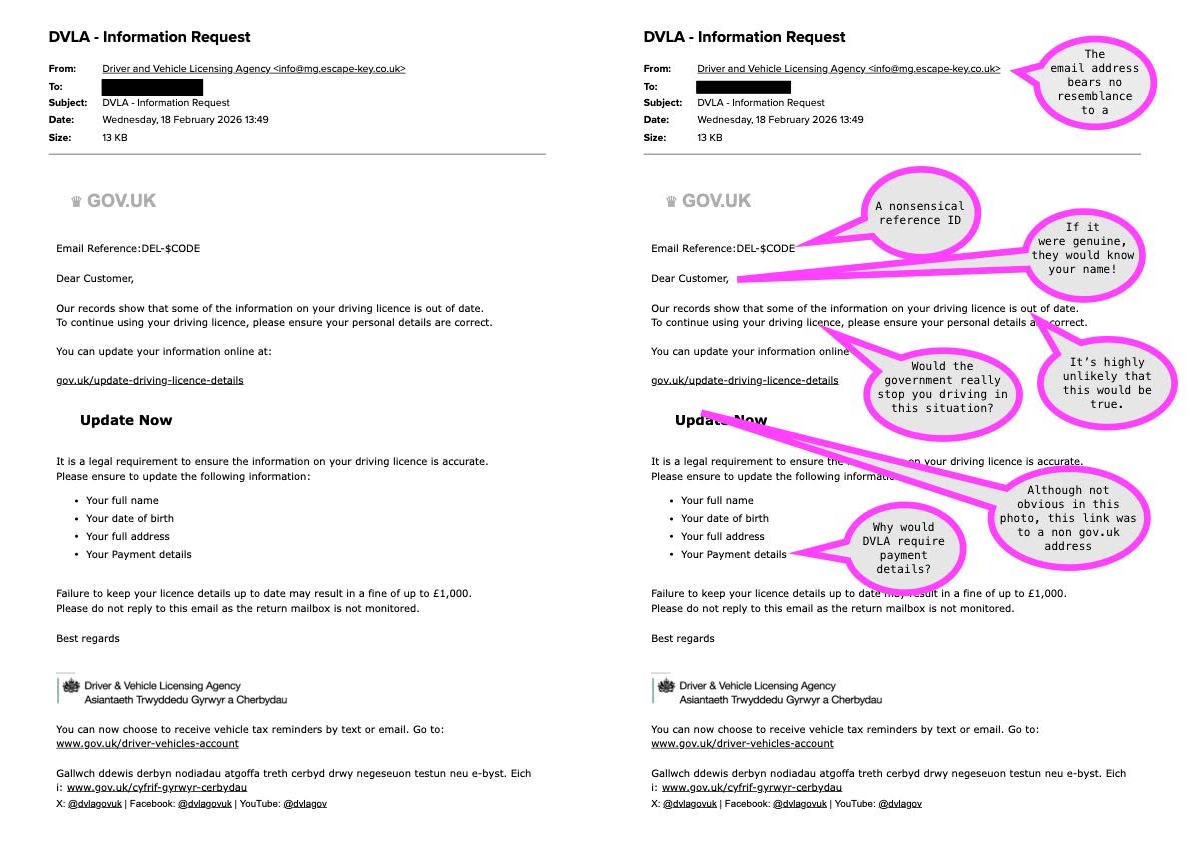
I received this email today and I thought it would be useful to share.
When you receive unexpected emails, ALWAYS treat them with caution. If they are malicious, the sender will often try to cause some concern and/or instill some urgency.
I’ve added the pink speech bubbles to the one I received to show you the sort of things to look out for – unusual email addresses, requests for the recipient to click on links or buttons, and claims that sound plausible but which in fact can be easily checked.
The golden rules are:
1. Check all unexpected emails carefully using this one as an example.
2. Never click on links or buttons in emails that you are not expecting. If in doubt, use a web browser to go direct to the organisation’s web site.
3. If you do click on anything malicious, never give out personal or payment details.
Remember, it’s far better to be safe than sorry so always err on the side of caution. If someone is pressuring you to give information or payment, it’s almost certain that they are not one of the good guys!